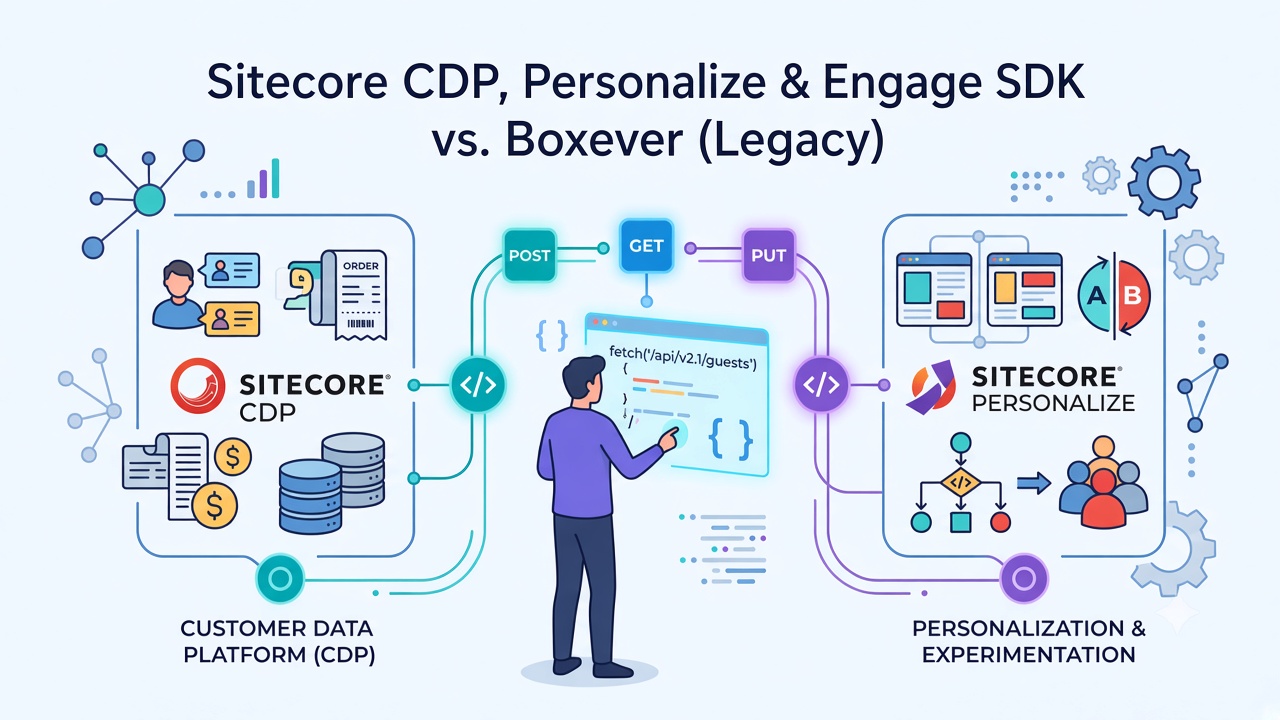
Sitecore CDP and Personalize APIs Practical Reference
While working with Sitecore CDP and Personalize, I ended up using a small set of APIs repeatedly for guest, order, batch, audience export, and Personalize flow operations.
I put them together here as a practical reference based on what I used and the details I found important to remember—especially:
- Authentication (Basic Auth vs OAuth)
- API versions and endpoints
- Environment / regional base URLs
This is not a complete API catalog. Sitecore provides additional APIs, so the official documentation is still the place to explore beyond what is covered here.
Sitecore CDP, Personalize & Engage SDK vs. Boxever (Legacy)
If you work with Sitecore CDP or Personalize documentation, you will still come across the name Boxever.
Boxever was the technology behind these products before they became part of Sitecore. Current docs are published under Sitecore CDP and Sitecore Personalize, but older API versions, SDK references, examples, and integrations still use Boxever terminology. Sitecore still maintains some legacy Boxever documentation and notes that older Boxever instances may use the 2.0 data model.
For example, you may still see:
- Boxever JavaScript Library
api.boxever.com- Boxever client key
- Boxever-related legacy documentation
That does not mean there is a separate product you need to integrate with. It usually means the API or documentation belongs to the older Boxever generation.
Sitecore now recommends the Engage SDK instead of the legacy Boxever JavaScript Library, which is no longer receiving updates.
So when reading an older example, check the API version and documentation section before using it as-is.
Key terms
| Term | Plain meaning |
|---|---|
| Sitecore CDP | Customer Data Platform—stores guest profiles, sessions, orders, and behavioral data. |
| Sitecore Personalize | Decisioning layer—runs experiences and experiments (who sees what, when). |
| Guest | A person or anonymous visitor in CDP. Related data hangs off a guest ref. |
| Client Key | Tenant identifier. Basic Auth username, and often clientKey in JSON payloads. |
| API Token | Secret paired with the Client Key for Basic Auth (password). Guest, Order, Batch. |
| API Key / API Secret | OAuth app credentials from Developer center. Exchanged for a Bearer access_token. |
| Audience | Rule-based group of guests used to decide who enters an experience variant. |
| Segment | CDP-side set of guests matching criteria; often the source of “who” Personalize targets. |
| Flow Definition | API object for an experience or experiment—name, friendly id, splits, schedule, status. |
| Friendly ID | Human-readable unique id for a flow (handy for lookup without storing a UUID). |
Flow ref | System UUID for a flow. Required for update (PUT) and precise retrieval. |
| Variant / split | One version of content or behavior inside a flow. |
| Experience vs Experiment | Experience = personalized content for audiences. Experiment = A/B/n test across variants. |
| Batch API | Bulk upload path—gzip visitor/guest records into CDP asynchronously. |
| Audience Export | Job that dumps audience membership to downloadable (presigned) files. |
| Stream / Engage API | Realtime collection endpoint for browser/SDK events. |
Authentication
The APIs covered here use two main authentication patterns. Mixing them up is the most common cause of 401 errors.
| API area | Authentication |
|---|---|
| CDP Guest | Basic Auth |
| CDP Guest Data Extension | Basic Auth |
| CDP Order and related APIs | Basic Auth |
| CDP Batch API | Basic Auth for CDP API calls (not for the presigned upload) |
| CDP Audience Export | OAuth 2.0 |
| Personalize Flow Definitions | OAuth 2.0 |
Where to get credentials
A) Client Key + API Token → Basic Auth
Used by Guest, Order, Batch, and related REST APIs.
- Open Sitecore Cloud Portal → launch Sitecore CDP.
- Go to Settings → API access.
- Copy Client Key (username) and API Token (password).
B) API Key + API Secret → OAuth Bearer
Used by Personalize Flow Definitions, Audience Export, and other OAuth-protected APIs.
- Personalize: Portal → Sitecore Personalize → Developer center → API keys → Create API key
- CDP Audience Export: Portal → Sitecore CDP → Developer center → API keys → Create
Name the key, select the feature/scopes you need, save, then copy API key (client_id) and API secret (client_secret) immediately—they are shown once.
An API key is created for a particular feature. A successful OAuth token request does not automatically give access to every API.
Basic Authentication
Username = Client Key
Password = API Token
Example:
curl -X GET '<baseURL>/v2.1/guests' \
  -u '<CLIENT_KEY>:<API_TOKEN>' \
  -H 'Accept: application/json'
OAuth 2.0
Typical token flow:
- Exchange API Key + API Secret for a token
POST /oauth/token- Receive Bearer access token
- Send the token on each API request
Token request:
curl -X POST 'https://auth.sitecorecloud.io/oauth/token' \
  --header 'Content-Type: application/x-www-form-urlencoded' \
  --data-urlencode 'client_id=<API_KEY>' \
  --data-urlencode 'client_secret=<API_SECRET>' \
  --data-urlencode 'grant_type=client_credentials' \
  --data-urlencode 'audience=https://api.sitecorecloud.io'
Example response:
{
  "access_token": "<token>",
  "scope": "personalize.flows:manage ...",
  "expires_in": 86400,
  "token_type": "Bearer"
}
Send on every OAuth-protected call:
Authorization: Bearer <access_token>
Sitecore documents roughly a 24-hour access-token lifetime and recommends caching the token rather than requesting one for every call. Refresh on 401 or a few minutes before expiry.
Suggested env names (keep secrets out of source control):
| Variable | Maps to |
|---|---|
CLIENT_KEY | Settings → API access → Client Key |
API_TOKEN | Settings → API access → API Token |
CLIENT_ID | Developer center API key |
CLIENT_SECRET | Developer center API secret |
BASE_URL | Regional engage host (or legacy Boxever host if still in use) |
Regional API endpoints
The base URL is determined by the environment of the Sitecore CDP or Personalize instance.
In CDP or Personalize: Company information → Environment. Match your region:
| Region | Base URL |
|---|---|
| AP | https://api-engage-ap.sitecorecloud.io |
| EU | https://api-engage-eu.sitecorecloud.io |
| JP | https://api-engage-jpe.sitecorecloud.io |
| US | https://api-engage-us.sitecorecloud.io |
Legacy hosts (older docs and tooling may still use these):
| Region | Legacy host |
|---|---|
| Europe | https://api.boxever.com |
| US | https://api-us.boxever.com |
| Asia Pacific | https://api-ap-southeast-2-production.boxever.com |
Prefer regional api-engage-* hosts for new work. Also keep in mind:
- Flow Definition docs commonly use
/v3/flowDefinitions; older integrations may still call/v2/flowDefinitions(often on a Boxever host) - Put the host in config—do not hard-code one region
- Requests must use HTTPS
- The exact base URL for an API should come from your environment and current docs, not from another tenant or an older Boxever example
How the pieces connect
Credentials from the Sitecore Cloud Portal split into Basic Auth (Guest / Order / Batch) and OAuth (Audience Export / Flow Definitions), then both paths call your regional API host:
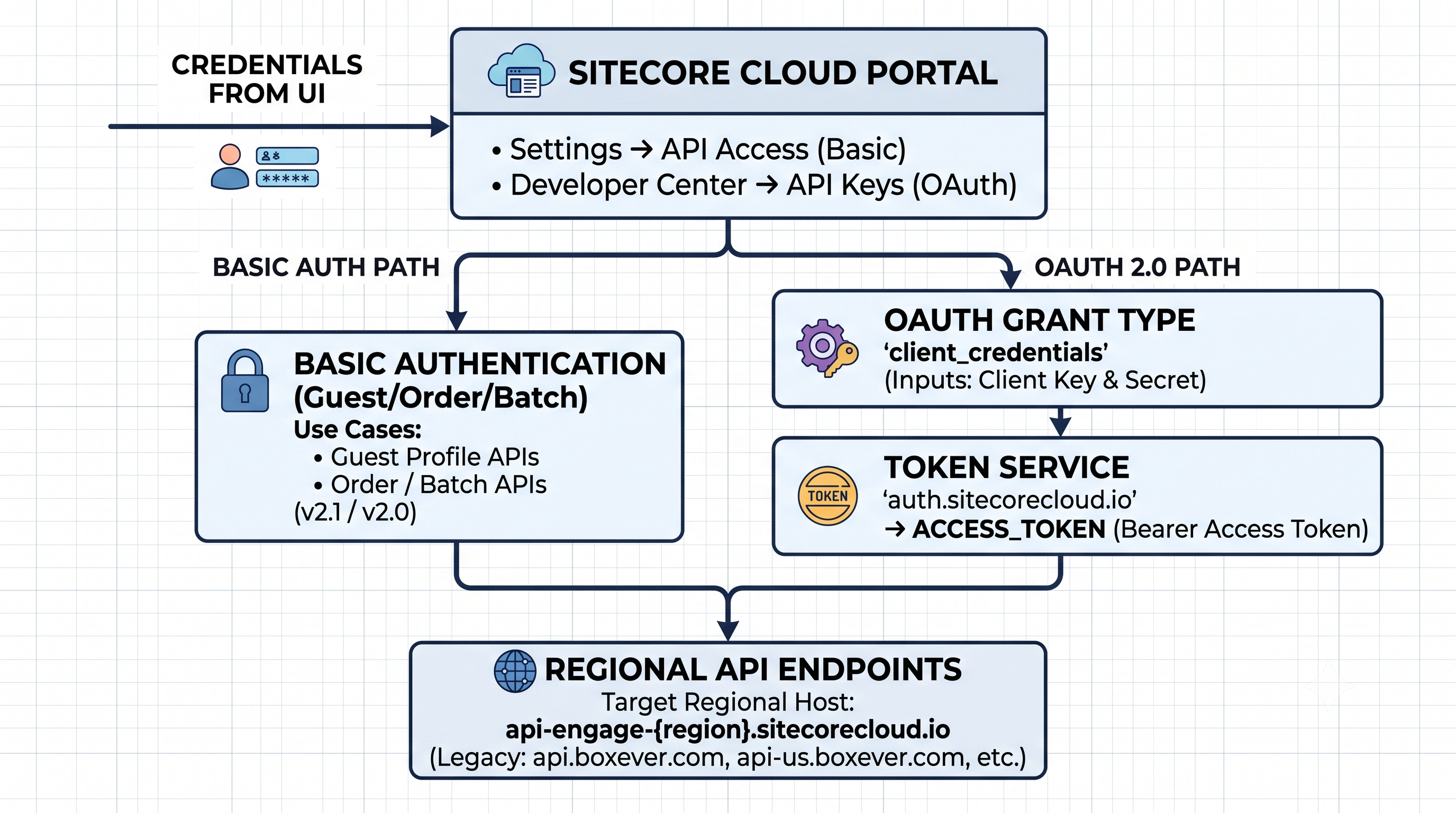
Sitecore Cloud Portal credentials → Basic Auth or OAuth → regional api-engage-{region} hosts (plus legacy Boxever hosts when needed).
With auth and hosts in place, the next sections walk the APIs in sequence:
- Guest REST API
- Guest Data Extension API
- Order APIs
- Batch API
- Audience Export API
- Personalize Flow Definition API
- Stream API / Engage SDK
API endpoint reference
These are the APIs covered in this article and the endpoints I worked with.
| API | Method | Endpoint | Authentication |
|---|---|---|---|
| Guest | GET | /v2.1/guests | Basic Auth |
| Guest | POST | /v2.1/guests | Basic Auth |
| Guest | GET / PUT / DELETE | /v2.1/guests/{guestRef} | Basic Auth |
| Guest Data Extension | nested under guest | /v2.1/guests/{guestRef}/... | Basic Auth |
| Order | GET / POST | /v2.1/orders | Basic Auth |
| Order (nested) | — | /v2.1/orders/{orderRef}/... | Basic Auth |
| Batch | PUT / GET | /v2/batches/{batchUuid} | Basic Auth + presigned upload |
| Audience Export | GET (confirm path) | e.g. /v2/audienceExports | OAuth 2.0 |
| Flow Definition | GET | /v3/flowDefinitions | OAuth 2.0 |
| Flow Definition | POST | /v3/flowDefinitions | OAuth 2.0 |
| Flow Definition | GET | /v3/flowDefinitions/{flowDefinitionRef} | OAuth 2.0 |
| Flow Definition | PUT | /v3/flowDefinitions/{flowDefinitionRef} | OAuth 2.0 |
| Flow Definition (legacy) | GET / POST / PUT | /v2/flowDefinitions (and by friendly id / ref) | OAuth 2.0 |
The Guest, Guest Data Extension, and Order APIs have v2 and v2.1 generations. For tenants using the 2.1 data model, Sitecore recommends the v2.1 APIs.
The current Personalize Flow Definition API uses v3 on regional hosts. Older working integrations may still use v2 on legacy hosts.
Interactive OpenAPI catalog: api-docs.sitecore.com.
1. Guest REST API
Official documentation: Guest REST API v2.1 – Sitecore
- Use: Create, search, update, and delete guest profiles—the core CDP identity record that orders, extensions, and sessions hang off.
- Prerequisites: Regional
BASE_URL, Client Key + API Token (Basic Auth), and a 2.1 data-model tenant if you call/v2.1/guests. - Input: Query params for search (for example
email), or a JSON body withguestType, identifiers, name, and email fields for create/update. - Output: Guest JSON including a system
ref(UUID) you reuse for later Guest, Extension, and Order work.
A guest is the core profile entity in CDP. Related transactional and behavioral information is associated with that profile.
For a tenant using the 2.1 data model, use the v2.1 Guest API:
/v2.1/guests
/v2.1/guests/{guestRef}
The v2.1 API adds capabilities compared with v2, including partial operations.
A pattern worth keeping in mind:
- Search for the guest (for example by email)
- If found → work with the existing guest
- If not found → create the guest
This helps avoid duplicate profiles. Create does not automatically check whether the guest already exists.
Example create:
curl -X POST "$BASE_URL/v2.1/guests" \
  -u "$CLIENT_KEY:$API_TOKEN" \
  -H 'Content-Type: application/json' \
  -H 'Accept: application/json' \
  -d '{
    "guestType": "customer",
    "email": "jane.doe@example.com",
    "emails": ["jane.doe@example.com"],
    "firstName": "Jane",
    "lastName": "Doe",
    "identifiers": [
      { "provider": "BXLP", "id": "USER-1002" },
      { "provider": "EMAIL", "id": "jane.doe@example.com" }
    ]
  }'
Example request (full URL)
- Search guests
GET https://api-engage-eu.sitecorecloud.io/v2.1/guests?email=jane.doe@example.com
curl -X GET 'https://api-engage-eu.sitecorecloud.io/v2.1/guests?email=jane.doe@example.com' \
  -u '<CLIENT_KEY>:<API_TOKEN>' \
  -H 'Accept: application/json'
- Create guest
POST https://api-engage-eu.sitecorecloud.io/v2.1/guests
curl -X POST 'https://api-engage-eu.sitecorecloud.io/v2.1/guests' \
  -u '<CLIENT_KEY>:<API_TOKEN>' \
  -H 'Content-Type: application/json' \
  -H 'Accept: application/json' \
  -d '{
    "guestType": "customer",
    "email": "jane.doe@example.com",
    "emails": ["jane.doe@example.com"],
    "firstName": "Jane",
    "lastName": "Doe",
    "identifiers": [
      { "provider": "BXLP", "id": "USER-1002" },
      { "provider": "EMAIL", "id": "jane.doe@example.com" }
    ]
  }'
Swap api-engage-eu for your regional host (ap, jpe, us).
With a guest ref in hand, the next step is often attaching custom attributes via Guest Data Extensions.
2. Guest Data Extension API
Official documentation: Guest data extension REST API v2.1 – Sitecore
- Use: Store custom attributes on an existing guest (loyalty tier, membership fields, and other org-specific key/value data) without changing the core guest schema.
- Prerequisites: Same Basic Auth as Guest APIs, plus an existing guest
reffrom a prior Guest search/create. - Input: Path includes
{guestRef}; JSON body with extensionname(ext…ext5) and camelCase attribute keys. - Output: The created/updated extension resource under that guest (readable again via nested guest extension endpoints).
Once you have a guest ref from the Guest API above, Guest Data Extensions hold additional guest attributes nested under that profile:
- Guest
- Guest Data Extension
The v2.1 API is more flexible than v2 for data-extension operations, including partial update and deletion support.
When reading older examples, check the API version before reusing the endpoint.
Example request (full URL)
Create data extension:
POST https://api-engage-eu.sitecorecloud.io/v2.1/guests/{guestRef}/extensions
curl -X POST 'https://api-engage-eu.sitecorecloud.io/v2.1/guests/f7aabbca-1c1b-4fc2-be72-3e16294a4f03/extensions' \
  -u '<CLIENT_KEY>:<API_TOKEN>' \
  -H 'Content-Type: application/json' \
  -H 'Accept: application/json' \
  -d '{
    "name": "ext",
    "loyaltyTier": "silver",
    "rewardBalance": "0",
    "memberSince": "2022-01-01T00:00",
    "loyaltyNumber": "L000000"
  }'
name must be one of ext, ext1 … ext5. Also:
- Keys must be camelCase primitives
- Keys must be unique across that guest’s extensions
Next, sync purchases against those guests with the Order APIs.
3. Order APIs
Official documentation: Order REST API v2.1 – Sitecore
- Use: Sync commerce purchases into CDP so identity rules can associate orders with guests for profiles, segmentation, and personalization context.
- Prerequisites: Basic Auth (Client Key + API Token), regional base URL, and ideally guest/contact identifiers you can attach so the order links to a profile.
- Input: Order JSON (
referenceId, channel, status, price, currency,orderedAt, …) plus nested contact/items under/v2.1/orders/{orderRef}/.... - Output: Order (and nested) resources with an order
ref; once linked, the purchase appears on the guest and can feed segments/exports.
After guest (and optional extension) data is in place, the Order API family covers commerce transactions and related resources:
- Order
- Order Item
- Order Contact
- Order Consumer
- Order Data Extension
- Order Item Data Extension
For tenants using the 2.1 data model, Sitecore provides v2.1 versions of these APIs. Authentication remains Client Key + API Token. v2.1 also adds partial update operations for supported resources.
Example request (full URL)
Create order:
POST https://api-engage-eu.sitecorecloud.io/v2.1/orders
curl -X POST 'https://api-engage-eu.sitecorecloud.io/v2.1/orders' \
  -u '<CLIENT_KEY>:<API_TOKEN>' \
  -H 'Content-Type: application/json' \
  -H 'Accept: application/json' \
  -d '{
    "referenceId": "B94TXY-1",
    "channel": "WEB",
    "pointOfSale": "myretailsite.com",
    "status": "PURCHASED",
    "orderedAt": "2025-03-07T16:15:11.000Z",
    "currencyCode": "EUR",
    "price": 100,
    "paymentType": "Card",
    "cardType": "Visa"
  }'
Then attach contact / items (nested under /v2.1/orders/{orderRef}/...) so identity rules can link the order to a guest. Example contact + item shape used with order sync:
{
  "contact": {
    "identifiers": [
      {
        "provider": "IDENTITY_SYSTEM",
        "id": "B7524AE6-CF1C-440F-B1A2-0C9D42F5CB41",
        "expiryDate": "2025-08-23T16:17:16.000Z"
      },
      { "provider": "CRM", "id": "123456789t" }
    ]
  },
  "orderItems": [
    {
      "type": "PRODUCT",
      "name": "Recoverable Speaker",
      "referenceId": "speaker-023",
      "quantity": 1,
      "price": 180.0,
      "currencyCode": "EUR",
      "status": "PURCHASED"
    }
  ]
}
When you need the same guest/order shapes at volume instead of one REST call at a time, continue with the Batch API next.
4. Batch API
Official documentation: Upload a batch file – Sitecore
- Use: Import or update large volumes of guests/orders asynchronously when one-by-one REST calls are too slow or noisy.
- Prerequisites: Basic Auth for allocate/status, a gzip NDJSON file (≤ 50 MB compressed), MD5 checksum + byte size, and a caller-chosen
batchUuid. - Input: Allocate body
{ checksum, size }, then the gzip binary uploaded to the returned presigned URL (no Basic Auth on that upload). - Output: Presigned
location.hreffrom allocate, then batch status from poll (GET) until processing finishes or fails.
When one-by-one Guest or Order REST calls are not enough, the Batch API is the bulk path—gzip many guest/order records and upload them asynchronously.
Basic flow:
- Prepare data
- Gzip the file
- Allocate upload location
- Upload the file
- Check batch status
Endpoints:
| Method | Path | Use |
|---|---|---|
PUT | /v2/batches/{batchUuid} | Allocate upload (send MD5 checksum + size) |
PUT | presigned location.href | Upload gzip binary |
GET | /v2/batches/{batchUuid} | Poll status |
Important limits and auth details:
- Compressed batch file has a 50 MB limit—split larger files and upload separately.
- The generated upload URL is valid for about one hour.
- CDP allocate/status calls use Basic Auth.
- The presigned upload uses no Basic Auth—send the binary gzip file to
location.href.
Example batch file lines (NDJSON before gzip)
Each line is one record. Common shapes:
- Guest upsert — create or update a guest profile:
{"ref":"c16fcd95-cdb1-4e9d-afe1-23c950d2d612","schema":"guest","mode":"upsert","value":{"guestType":"customer","identifiers":[{"provider":"email","id":"ethan.rodriguez1@mail.com"}],"extensions":[{"name":"ext","key":"default","loyaltyTier":"bronze"}]}}
- Order upsert — create or update an order with items/contact:
{"ref":"d9d88af4-f8a4-4f14-9bf6-553f66a950c8","schema":"order","mode":"upsert","value":{"reference":"ORDER-SECOND-b23f00","currencyCode":"USD","orderedAt":"2025-09-22T07:05:05Z","orderItems":[{"name":"Recoverable Speaker","referenceId":"speaker-023","quantity":1,"price":180.0},{"name":"Accessory - Premium Cable","referenceId":"acc-cable-premium","quantity":1,"price":29.0}],"orderContact":{"email":"ethan.rodriguez1@mail.com"}}}
- Guest delete — remove a guest by identifier:
{"ref":"4bcad136-5a4f-4fbf-8b10-93cf7f93fbb0","schema":"guest","mode":"delete","value":{"identifiers":[{"provider":"EMAIL","id":"alexander.young@example.com"}]}}
Gzip the NDJSON file, then compute MD5 hex + byte size of the .gz file (those values go into the allocate call).
Example request (full URL)
Allocate batch upload:
PUT https://api-engage-eu.sitecorecloud.io/v2/batches/{batchUuid}
curl -X PUT 'https://api-engage-eu.sitecorecloud.io/v2/batches/78f3fdb4-4007-46d3-8ab1-902b722e39a4' \
  -u '<CLIENT_KEY>:<API_TOKEN>' \
  -H 'Content-Type: application/json' \
  -H 'Accept: application/json' \
  -d '{
    "checksum": "be754e3afd6e747df22a70eb05c54afe",
    "size": 491
  }'
checksum is the MD5 (hex) of the gzip file; size is the gzip file size in bytes. The response location.href is the presigned upload URL (valid ~1 hour). Upload the gzip binary to that URL without Basic Auth, then poll:
curl -X GET 'https://api-engage-eu.sitecorecloud.io/v2/batches/78f3fdb4-4007-46d3-8ab1-902b722e39a4' \
  -u '<CLIENT_KEY>:<API_TOKEN>' \
  -H 'Accept: application/json'
When you need segment membership as downloadable files instead of bulk upserts, switch auth models and use Audience Export.
5. Audience Export API
Official documentation: Audience export REST API overview – Sitecore · Interactive API catalog
- Use: Download segment/audience membership for use outside Sitecore CDP (ads platforms, CRM, BI, and other downstream systems).
- Prerequisites: A Scheduled or Live segment with members, an Audience Export job configured in CDP, and an OAuth API key created specifically for the Audience Export feature (not Basic Auth).
- Input: Bearer access token from
auth.sitecorecloud.io, then list/retrieve calls (for exampleGET /v2/audienceExports)—confirm exact paths in the API catalog for your tenant. - Output: Export job metadata plus presigned file URLs; finished files are often JSONL lines wrapping guest JSON in a
datastring (available roughly ~35 days).
Guest, Order, and Batch use Basic Auth. Audience Export is the first area in this walkthrough that switches to OAuth 2.0.
Basic flow:
- Create an API key (Audience Export feature)
- Request an OAuth token
- Call the Audience Export API
- Get export output (presigned URLs)
Confirm exact paths in the API catalog for your tenant—paths can vary by version. The API key must be created for the Audience Export capability; the selected feature matters here as well.
Example request (full URL)
List / retrieve audience exports:
GET https://api-engage-eu.sitecorecloud.io/v2/audienceExports
curl -X GET 'https://api-engage-eu.sitecorecloud.io/v2/audienceExports' \
  -H 'Authorization: Bearer <ACCESS_TOKEN>' \
  -H 'Accept: application/json'
Obtain <ACCESS_TOKEN> first via POST https://auth.sitecorecloud.io/oauth/token using a CDP API key scoped for Audience Export. Confirm the exact path and any job-specific retrieve URLs in the interactive API catalog for your tenant.
Finished export files are often JSONL. Each line wraps guest JSON in a data string, for example:
{"data":"{\"email\":\"jane.doe@example.com\",\"emails\":[\"jane.doe@example.com\"],\"ref\":\"bfc006d8-4b49-47a9-9017-55c0f5c2b483\",\"guestType\":\"visitor\",\"firstName\":\"Jane\",\"lastName\":\"Doe\",\"language\":\"EN\",\"sessions\":[]}"}
The same OAuth Bearer token style continues into Personalize when you create or update experiences.
6. Personalize Flow Definition API
Official documentation: Flow Definition REST API – Sitecore Personalize · Request an access token
- Use: Programmatically create and update Personalize experiences/experiments (who sees which variant, under which audience conditions).
- Prerequisites: Personalize API Key + Secret, OAuth Bearer token, regional (or legacy) API host, and a clear
friendlyId/ flow payload (type,subtype, traffic/splits, schedule). - Input: Flow Definition JSON—name,
friendlyId, channels, traffic splits/audiences, status, schedule—andAuthorization: Bearer <token>. - Output: Flow Definition resource with a system
ref(and friendly id) you use for later GET/PUT updates.
CDP APIs above manage guests, orders, and exports. Personalize Flow Definitions use the same OAuth pattern as Audience Export, and are the main REST surface for experiences and experiments.
A Flow Definition represents a Personalize experience or experiment. The current Flow Definition REST API is v3 on regional hosts.
Common operations:
GET /v3/flowDefinitions— list flowsPOST /v3/flowDefinitions— create a flowGET /v3/flowDefinitions/{flowDefinitionRef}— retrieve by refPUT /v3/flowDefinitions/{flowDefinitionRef}— update by ref
These requests use:
Authorization: Bearer <ACCESS_TOKEN>
When listing flows, each item includes a ref. Use that reference to retrieve or update a specific flow. You can also look up by friendly id (especially useful on legacy /v2 paths).
Practical pattern:
GETbyfriendlyId- If
404→POSTcreate - If it exists → adjust splits / status →
PUTbyref
When updating, GET the full flow, change what you need, and PUT the full JSON back. Do not send a minimal stub. If a flow is archived, unarchive it before refreshing splits.
Example request (full URL)
Example full-URL calls in this section:
- Create flow definition (embedded / API experience, legacy v2 host)
- Lookup by friendly id
- List flows (v3 regional)
- Create web experience (v3 docs-style sample)
Create flow definition (embedded / API experience):
POST https://api.boxever.com/v2/flowDefinitions
This is the shape used when creating page-level personalization flows (lookup by friendlyId, create on 404, update by ref):
curl -X POST 'https://api.boxever.com/v2/flowDefinitions' \
  -H 'Authorization: Bearer <ACCESS_TOKEN>' \
  -H 'Content-Type: application/json' \
  -H 'Accept: application/json' \
  -d '{
    "name": "macbook-pro en - 52c6e3b30da84071bf349317b47875e6",
    "friendlyId": "embedded_52c6e3b30da84071bf349317b47875e6_en",
    "clientKey": "<CLIENT_KEY>",
    "type": "INTERACTIVE_API_FLOW",
    "subtype": "EXPERIENCE",
    "channels": ["WEB"],
    "businessProcess": "interactive_v1",
    "siteId": "{C1BF4356-8202-4578-A324-7697F7685DE9}",
    "traffic": {
      "type": "audienceTraffic",
      "weightingAlgorithm": "USER_DEFINED",
      "splits": [
        {
          "template": "{\"variantId\":\"00000000-0000-0000-0000-000000000001\"}",
          "variantName": "fromGoogleMacbook",
          "audienceName": "fromGoogleMacbook",
          "conditionGroups": [
            {
              "conditions": [
                {
                  "templateId": "utm_value",
                  "params": {
                    "compares to": "is equal to",
                    "type": "source",
                    "UTM value": "google"
                  }
                }
              ]
            }
          ]
        }
      ]
    },
    "variants": [],
    "status": "DRAFT",
    "schedule": { "type": "simpleSchedule", "startDate": "2026-01-01T00:00:00.000Z" },
    "sampleSizeConfig": {
      "baseValue": 0.15,
      "minimumDetectableDifference": 0.02,
      "confidenceLevel": 0.95
    },
    "notificationEnabled": false
  }'
Lookup by friendly id:
GET https://api.boxever.com/v2/flowDefinitions/{friendlyId}
curl -X GET 'https://api.boxever.com/v2/flowDefinitions/embedded_52c6e3b30da84071bf349317b47875e6_en' \
  -H 'Authorization: Bearer <ACCESS_TOKEN>' \
  -H 'Accept: application/json'
List flows (v3 regional):
GET https://api-engage-eu.sitecorecloud.io/v3/flowDefinitions
curl -X GET 'https://api-engage-eu.sitecorecloud.io/v3/flowDefinitions' \
  -H 'Authorization: Bearer <ACCESS_TOKEN>' \
  -H 'Accept: application/json'
Create web experience (v3 docs-style sample):
POST https://api-engage-eu.sitecorecloud.io/v3/flowDefinitions
curl -X POST 'https://api-engage-eu.sitecorecloud.io/v3/flowDefinitions' \
  -H 'Authorization: Bearer <ACCESS_TOKEN>' \
  -H 'Content-Type: application/json' \
  -H 'Accept: application/json' \
  -d '{
    "name": "Alert bar 1",
    "friendlyId": "alert_bar_1",
    "type": "INTERACTIVE_WEB_FLOW",
    "subtype": "EXPERIENCE",
    "status": "DRAFT",
    "channels": ["WEB"],
    "traffic": {
      "type": "simpleTraffic",
      "splits": [],
      "weightingAlgorithm": "USER_DEFINED",
      "coupled": false,
      "allocation": 100
    },
    "schedule": {
      "type": "simpleSchedule",
      "startDate": "2026-01-01T00:00:00.000Z"
    },
    "sampleSizeConfig": {
      "baseValue": 0.02,
      "minimumDetectableDifference": 0.2,
      "confidenceLevel": 0.95
    },
    "businessProcess": "interactive_v1",
    "variants": []
  }'
Flow types to watch
Sitecore supports multiple flow types and subtypes. Two shapes you will see often:
a) Web experience (common in official docs):
{
  "type": "INTERACTIVE_WEB_FLOW",
  "subtype": "EXPERIENCE",
  "traffic": { "type": "simpleTraffic" }
}
b) Embedded / API-driven experience (for example, bridging variants into XM Cloud layout rules):
{
  "type": "INTERACTIVE_API_FLOW",
  "subtype": "EXPERIENCE",
  "clientKey": "<CLIENT_KEY>",
  "traffic": { "type": "audienceTraffic" }
}
Match type, traffic, and the full request body to your use case and the current Flow Definition documentation—do not copy a sample blindly.
Example: get a token and create a flow
async function getAccessToken(clientId, clientSecret) {
  const body = new URLSearchParams({
    client_id: clientId,
    client_secret: clientSecret,
    grant_type: 'client_credentials',
    audience: 'https://api.sitecorecloud.io',
  });

  const res = await fetch('https://auth.sitecorecloud.io/oauth/token', {
    method: 'POST',
    headers: { 'Content-Type': 'application/x-www-form-urlencoded' },
    body,
  });
  if (!res.ok) throw new Error(`Token failed: ${res.status}`);
  const data = await res.json();
  return data.access_token;
}

async function createExperience(apiBase, accessToken, payload) {
  const res = await fetch(`${apiBase}/flowDefinitions`, {
    method: 'POST',
    headers: {
      Authorization: `Bearer ${accessToken}`,
      'Content-Type': 'application/json',
      Accept: 'application/json',
    },
    body: JSON.stringify(payload),
  });
  return res.json();
}

const token = await getAccessToken(process.env.CLIENT_ID, process.env.CLIENT_SECRET);
const flow = await createExperience(process.env.BOXEVER_API_BASE || 'https://api.boxever.com/v2', token, {
  name: 'macbook-pro en - 52c6e3b30da84071bf349317b47875e6',
  friendlyId: 'embedded_52c6e3b30da84071bf349317b47875e6_en',
  clientKey: process.env.CLIENT_KEY,
  type: 'INTERACTIVE_API_FLOW',
  subtype: 'EXPERIENCE',
  channels: ['WEB'],
  businessProcess: 'interactive_v1',
  siteId: '{C1BF4356-8202-4578-A324-7697F7685DE9}',
  status: 'DRAFT',
  traffic: {
    type: 'audienceTraffic',
    weightingAlgorithm: 'USER_DEFINED',
    splits: [
      {
        template: JSON.stringify({ variantId: '00000000-0000-0000-0000-000000000001' }),
        variantName: 'fromGoogleMacbook',
        audienceName: 'fromGoogleMacbook',
        conditionGroups: [
          {
            conditions: [
              {
                templateId: 'utm_value',
                params: {
                  'compares to': 'is equal to',
                  type: 'source',
                  'UTM value': 'google',
                },
              },
            ],
          },
        ],
      },
    ],
  },
  variants: [],
  schedule: { type: 'simpleSchedule', startDate: new Date().toISOString() },
  sampleSizeConfig: {
    baseValue: 0.15,
    minimumDetectableDifference: 0.02,
    confidenceLevel: 0.95,
  },
  notificationEnabled: false,
});

console.log('Created flow ref:', flow.ref);
Flows decide who sees what. To feed live behavior into CDP for those decisions, use the Stream API (or Engage SDK) next.
7. Stream API
Official documentation: Stream API – Sitecore · Engage SDK vs legacy Boxever JS library
- Use: Send real-time behavioral/transactional events (page views, identity, cart, purchase) into CDP so profiles and Personalize decisions stay current.
- Prerequisites: Regional Stream target URL, Client Key, and either Engage SDK (preferred for web) or direct HTTP calls; for events after browser create, you need a
browser_id. - Input: Browser create with
client_key; event create withclient_keyplus amessageJSON (browser_id, channel, type, page, POS, …). - Output: Browser create returns a
browser_id; event calls accept the event into CDP (visible later on the guest session/profile).
REST and Flow Definition APIs manage resources. The Stream API is different: it sends events into Sitecore CDP. Sitecore provides direct HTTP interfaces and recommends the Engage SDK for web integrations (instead of the legacy Boxever JavaScript Library).
Keep this distinction in mind:
- REST APIs → work with CDP / Personalize resources
- Stream API → send events into CDP
The Stream API uses the same environment-specific regional base URL described earlier. It is not used for CRUD on flow definitions.
Example request (full URL)
Direct HTTP Stream calls commonly use GET with query parameters (Engage SDK is preferred for production web apps).
- Create browser ID
GET https://api-engage-eu.sitecorecloud.io/v1.2/browser/create.json
curl -X GET -g 'https://api-engage-eu.sitecorecloud.io/v1.2/browser/create.json?client_key=<CLIENT_KEY>'
- Send a VIEW event
GET https://api-engage-eu.sitecorecloud.io/v1.2/event/create.json
curl -X GET -g 'https://api-engage-eu.sitecorecloud.io/v1.2/event/create.json?client_key=<CLIENT_KEY>&message={"browser_id":"<BROWSER_ID>","channel":"WEB","type":"VIEW","language":"EN","currency":"USD","page":"/speakers","pos":"default"}'
Every event must include the browser_id returned from the browser create call. URL-encode the message JSON when required by your client.
Other event types used in session simulation include:
IDENTITYADDUPDATE_CARTPURCHASEABANDONSEARCH
With guests, orders, bulk load, exports, flows, and Stream covered, use the version table and quick reference below when an older Boxever example disagrees with a current Sitecore path.
Version reminder
Check the version before copying an older example.
| Area | Versions / paths to expect |
|---|---|
| CDP Guest / Guest Data Extension | /v2 and /v2.1 |
| CDP Order | /v2 and /v2.1 |
| CDP Batch | /v2/batches/... |
| Personalize Flow Definition | /v3 (current) and /v2 (legacy integrations) |
| Data model | 2.1 on newer tenants; older Boxever environments may still use 2.0 |
That is why an older Boxever example can look different from current Sitecore documentation without being “wrong” for the environment it was written for.
Common use cases
| Goal | Product | Auth | Start here |
|---|---|---|---|
| Create / update an experience | Personalize | OAuth | POST / PUT /v3/flowDefinitions (or legacy /v2) |
| List all experiences / experiments | Personalize | OAuth | GET /v3/flowDefinitions |
| Upsert a customer profile | CDP | Basic | Search then POST / PUT /v2.1/guests |
| Import thousands of guests | CDP | Basic | Batch allocate → upload → poll |
| Sync purchases | CDP | Basic | /v2.1/orders (+ contact) |
| Download segment output | CDP | OAuth | Audience Export APIs |
| Capture live web events | Stream | Client / SDK config | Regional Stream target endpoint |
Quick reference
| API | Version / endpoint | Auth | Purpose |
|---|---|---|---|
| Guest | /v2.1/guests | Basic Auth | Guest profile operations |
| Guest Data Extension | v2.1 nested under guest | Basic Auth | Additional guest attributes |
| Order | /v2.1/orders/... | Basic Auth | Order-related data |
| Batch | /v2/batches/... | Basic Auth + presigned upload | Bulk data upload |
| Audience Export | REST API (confirm path) | OAuth 2.0 | Access exported audience data |
| Flow Definition | /v3/flowDefinitions (or legacy /v2) | OAuth 2.0 | Personalize experiences / experiments |
| Stream | Browser / Event API | Stream integration | Real-time event capture |
This table represents the APIs covered in this article, not the complete Sitecore API surface.
Final note
These are the Sitecore CDP and Personalize APIs I worked with and wanted to keep together as a common reference.
The main things worth remembering:
- Two auth models: Guest / Order / Batch stay on Basic Auth; Flow Definitions and Audience Export use OAuth
- CDP v2 vs v2.1 (and 2.0 vs 2.1 data models)
- Personalize Flow Definition v3 on regional hosts, with v2 still appearing in older integrations
- Environment-specific base URL (prefer
api-engage-*; expect legacy Boxever hosts in older examples) - Feature-scoped API keys, token caching, and search-before-create for guests
- Batch: Basic Auth for allocate/status, no Basic Auth on the presigned gzip upload
When an older example contains Boxever in the API name, SDK name, hostname, or documentation, check the version and product documentation before assuming it is a current Sitecore endpoint.
Use this article as a working reference for auth, versions, and request shapes. Keep credentials in a secret store, cache OAuth tokens, and treat base URL (region + v2/v3) as configuration.
For anything not covered here, the current Sitecore documentation and API catalog are the right place to continue.
Official documentation
- Sitecore CDP REST APIs
- Sitecore CDP API Catalog
- Sitecore CDP Data Models
- CDP authentication & authorization
- Batch upload
- Sitecore Personalize REST APIs
- Sitecore Personalize Flow Definition API
- Request an access token
- Create an API key (Personalize)
- Base URL by region
- Engage SDK vs legacy Boxever JS library